Supply
SUPPLY sets, switches and records a programmable supply: the PD mini, a USB-PD (USB Power Delivery) trigger that the IOmcu drives over a UART (universal asynchronous receiver-transmitter) on two of its pins. It opens from the SUPPLY tile on the menu, always on LIVE.
The strip
The strip at the top holds two tasks, LIVE and SETTINGS. A tap switches the task. LIVE keeps its view, PLOT or TABLE, across a switch.
| Task | The left column |
|---|---|
| LIVE | the plot or the table, and the set points |
| SETTINGS | the caps, the start values, the trips and the questions (SETTINGS) |
The right column is the same on both tasks: the readings, and the CONTROL card with RESET PEAKS and OUTPUT ON at its foot, where SERVO and MOTOR & ESC have ARM. The header is the row right of the strip: the supply, its state and the range the set points may take. It stays in sight on both tasks and under the keypad and the question. The home tag climbs one level at a time: over the question it drops the change, as CANCEL does; over a keypad it closes the keypad and keeps the value. A switch of task is no level: from LIVE or SETTINGS with nothing open it goes to the menu.
The supply model
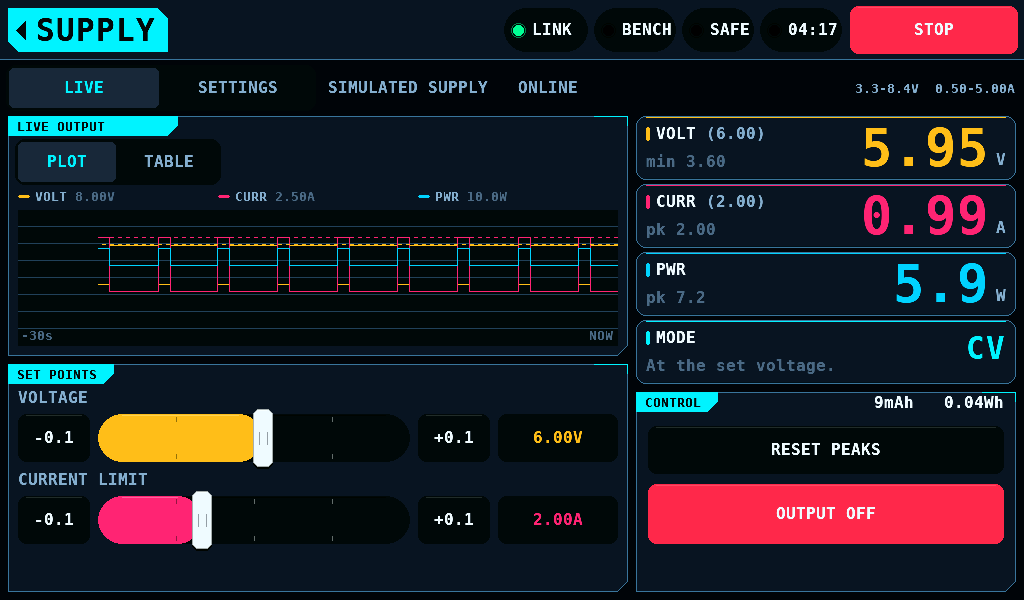
With the PD mini disabled on SETUP, INTERFACES, the panel runs a model of a supply. The header reads SIMULATED SUPPLY and the menu tile is marked SIMULATED. The model is a 6Ω load with a 1.4A burst for 0.6s every 3s, behind a 0.05Ω source resistance. Its readings are not measured, and nothing on the bench is powered.
The PD mini
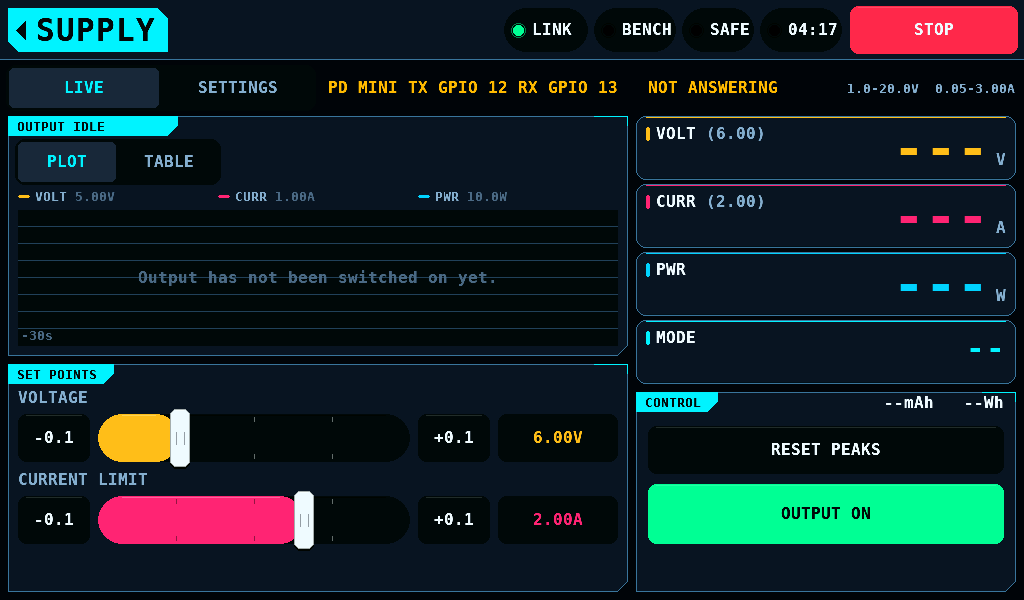
With the PD mini enabled, the header names the module and the IOmcu pins that carry it, for example PD MINI TX GPIO 12 RX GPIO 13, from the PD mini TX and PD mini RX settings. With either pin not set, or both on one GPIO, it reads PD MINI NO PINS. The panel reads the IOmcu's SUPPLY page every 100ms.
| Header | Meaning |
|---|---|
ONLINE 38400 | the module answers; the number is the baud rate in use |
NOT ANSWERING | no IOmcu of 0.10.0 or later answers, or the readings are older than 1500ms; an output that is on is switched off |
Before the first switch-on the plot reads Output has not been switched on yet., and the cards show dashes until a reading arrives.
The readings
| Card | Shows |
|---|---|
| VOLT | the output voltage; the set point in brackets; the run's lowest voltage under it |
| CURR | the output current; the current limit in brackets; the run's peak under it |
| PWR | the output power and the run's peak |
| MODE | CV (constant voltage) at the set voltage, CC (constant current) at the current limit, TRIPPED after a trip; CC is drawn in the warning colour |
The plot shows voltage, current and power over the last 30s, with each set point as a dashed line. TABLE lists the same values. The bracketed value is the set point the supply reports; while it does not answer, the one the screen holds.
Set points
| Set point | Model | PD mini | Step buttons |
|---|---|---|---|
| VOLTAGE | 3.3 to 21V, 20mV steps | 1 to 20V, 10mV steps | 0.1V |
| CURRENT LIMIT | 0.5 to 5A, 50mA steps | 0.05 to 3A, 10mA steps | 0.1A |
The PD mini's ranges are from the vendor's page, not measured. The PD mini gives no more than it is fed: its voltage is capped 0.7V under the input voltage it reports, so a 5V input allows at most 4.3V. The caps in SETTINGS narrow both ranges, and the range in use shows at the right end of the header.
- Drag a slider, or tap its track to set the value under the finger.
-0.1and+0.1step the value.- A tap on the VOLT or CURR card, or on a set point's value at the right end of its row, opens the keypad.
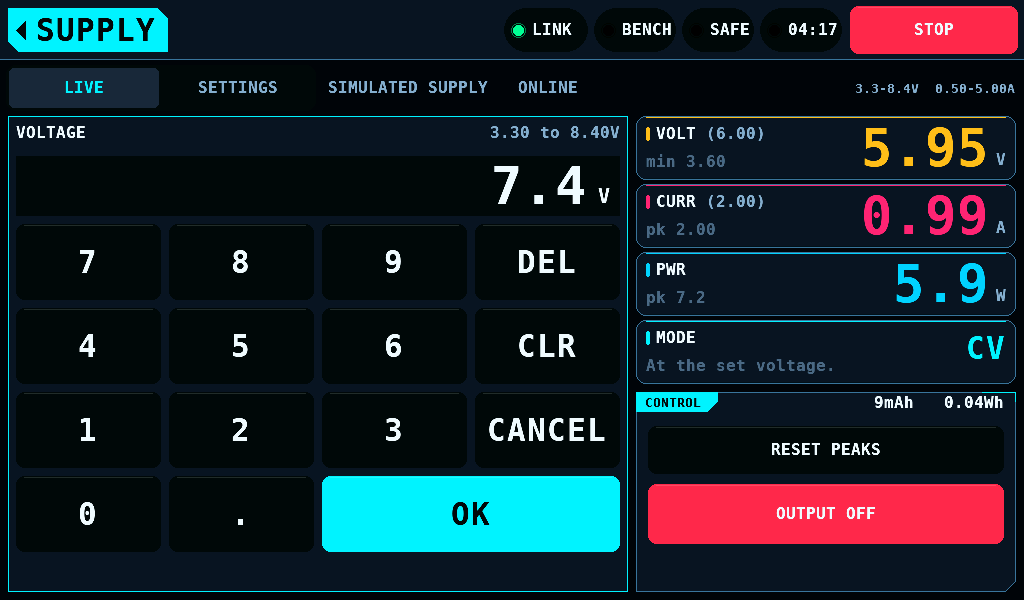
The keypad shows the range in its title row. OK takes a value inside the range, rounded to the supply's step. A value outside the range is refused and the range turns to the warning colour. CANCEL, or OK with nothing typed, keeps the set point.
A change to a live output
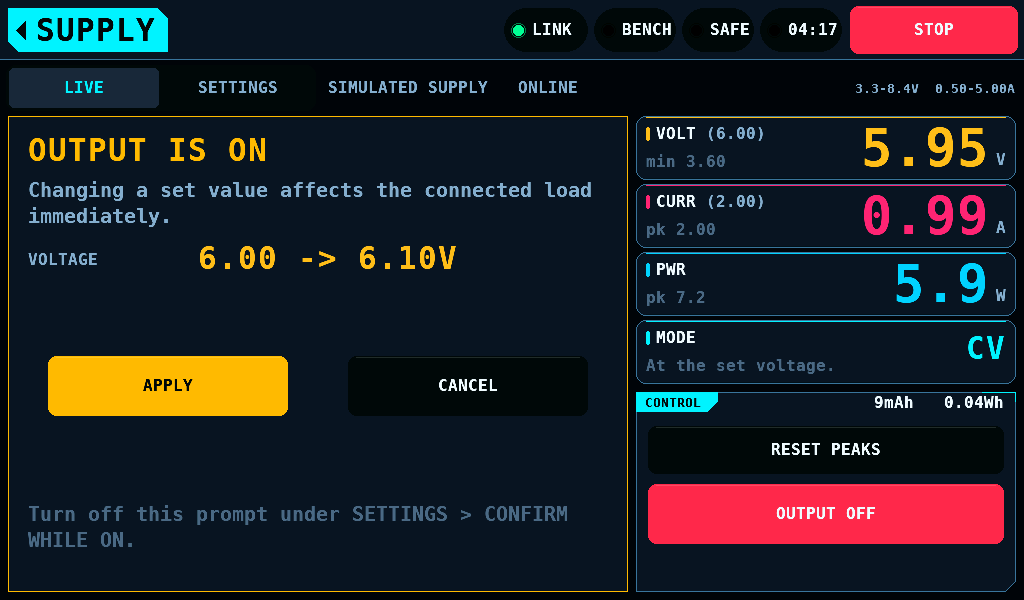
While the output is on, a new set point opens a question that names the change. APPLY gives it to the supply; CANCEL drops it and the slider goes back. A drag asks once, on the release; a drag that ends without its finger lifting, such as at the home tag tapped with a second finger, asks nothing, and the slider goes back. With the output off nothing is asked. SETTINGS switches the question off for the slider and for the keypad separately.
OUTPUT ON and OFF
OUTPUT ON is a 2s hold, with the fade ARM uses. OUTPUT OFF is a tap. The output switches off, and stays off until the next hold, on:
- STOP, on any screen;
- leaving SUPPLY, for an output SUPPLY switched on;
- a supply that stops answering, or that sends no reading for 3000ms;
- a trip;
- a PD mini input voltage under the set point plus 0.5V on 2 reads in a row;
- the module switching its output off itself;
- a change to the PD mini's pins, baud rate or enable setting.
The band names the reason. An output another screen switched on stays as it is when SUPPLY is left. The output is off after every restart, whatever the start values.
SETTINGS
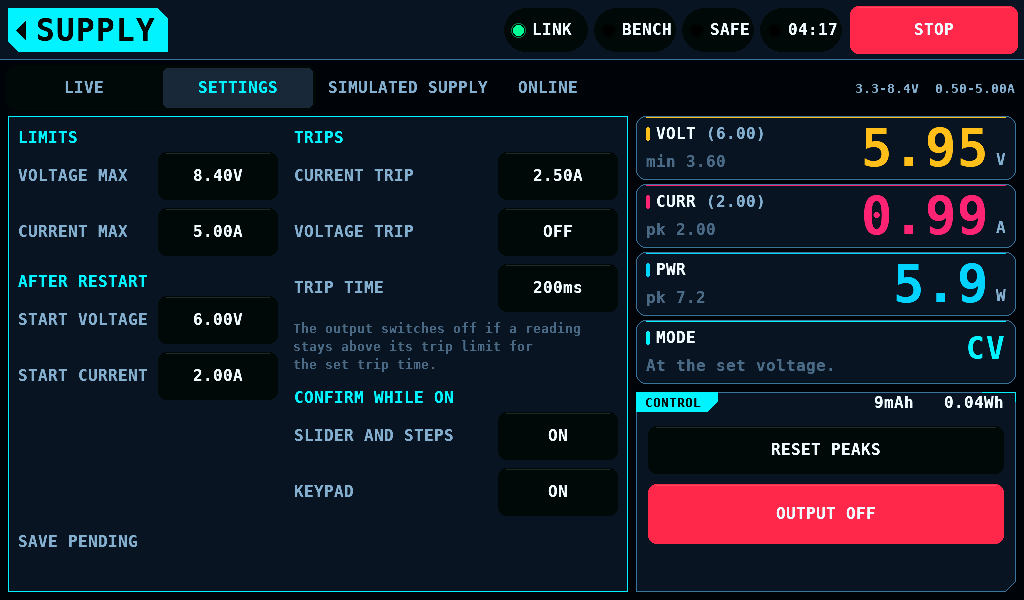
SETTINGS, the strip's second tab, shows the settings in the left column. A value opens the keypad; a switch flips on the tap. A tap on LIVE while the keypad is open closes it and keeps the value, as CANCEL does. While the question about a live output is open, the strip waits for APPLY or CANCEL.
| Setting | Range | Default | What it does |
|---|---|---|---|
| VOLTAGE MAX | 3.3 to 21V | 21.00V | the highest voltage a set point takes |
| CURRENT MAX | 0.5 to 5A | 5.00A | the highest current limit a set point takes |
| START VOLTAGE | up to VOLTAGE MAX | 6.00V | the voltage set point after a restart |
| START CURRENT | up to CURRENT MAX | 2.00A | the current limit after a restart |
| CURRENT TRIP | 0 to 5A | OFF | output off once the current is over it for TRIP TIME |
| VOLTAGE TRIP | 0 to 21V | OFF | output off once the voltage is over it for TRIP TIME |
| TRIP TIME | 0 to 5000ms | 100ms | how long a reading is over a trip before it fires |
| SLIDER AND STEPS | ON, OFF | ON | ask before the slider changes a live output |
| KEYPAD | ON, OFF | ON | ask before the keypad changes a live output |
- A trip of 0 is off.
- A current trip at or above CURRENT LIMIT does not fire: the supply holds the limit in CC.
- A cap lowered under a set point brings the set point down to it.
The settings are kept in NVS (non-volatile storage). They are written on the next frame with the bench SAFE and the output off. The bottom line reads SAVED, SAVE PENDING, NOT SAVED or SETUP CHANGES NOT SAVED.
With the PD mini as the supply, SETTINGS also offers RESET PD MINI. It switches the output off and restarts the module, for a module that shows ERR. Whether a restart clears every ERR is not measured.
The log of a run
A run is one switch-on of the output. The plot clears when the output comes on and holds the run after it goes off. The mAh and Wh on the CONTROL card's title line count the run. RESET PEAKS starts the lowest and highest values again from the current reading.
Each run is written to its own SUPPLnnn.CSV in BENCH/LOGS on the SD (Secure Digital) card, while Auto logs on SETUP > SD CARD is ON, one row every 50ms, with the set point, voltage, limit, current, power, mode, charge, energy and source, measured or model. Logs opens it.
Related pages
- Interfaces: PD mini, PD mini TX, PD mini RX and PD mini baud.
- Servo: the same set points and output switch on the SERVO screen.