Motor settings
SETTINGS, the third tab of MOTOR & ESC's strip, holds the bench's 8 ESC (electronic speed controller) settings in the left column under three headings, in two columns: PACK and MOTOR on the left, THROTTLE OUTPUT on the right. The right column stays in place and works: the readouts, TARGET, ARM, the totals and RESET PEAKS.
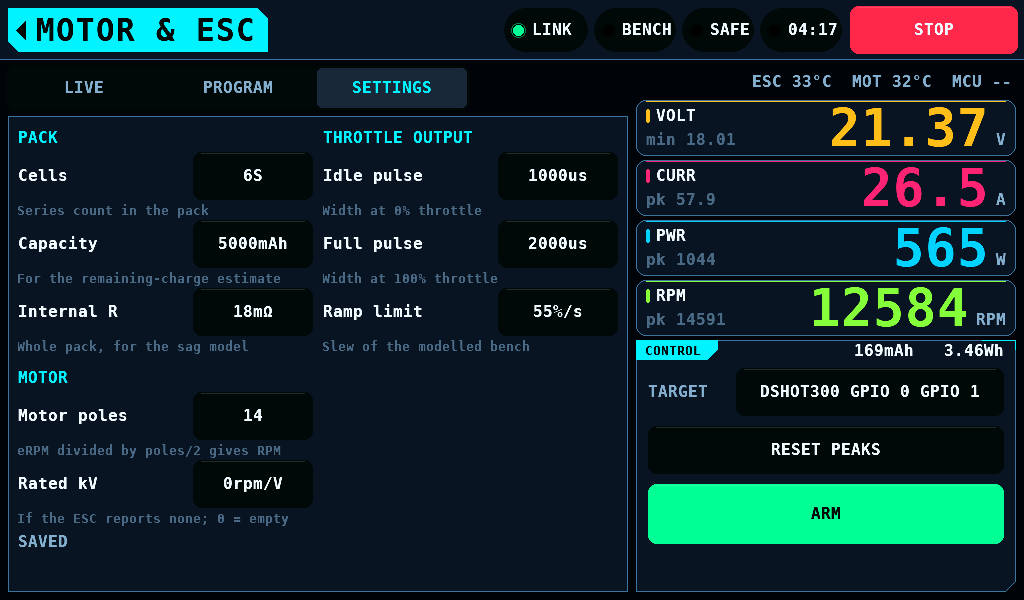
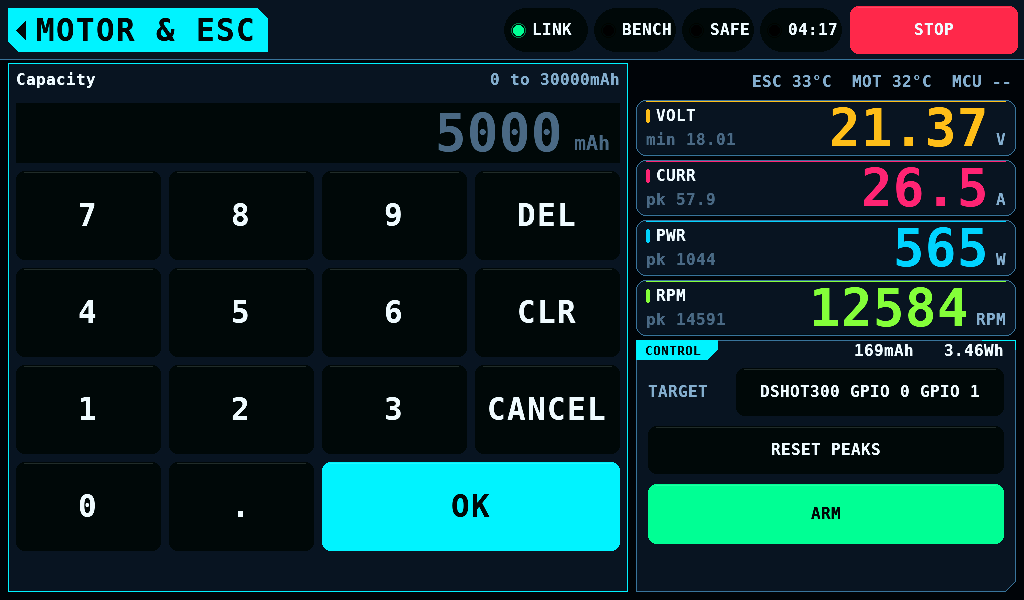
A row shows the setting and its value with its unit, 48px tall, and a help line under them. A tap on the value opens the keypad over the left column and the strip. The keypad names the setting and its range. OK takes a value inside the range; a value outside it keeps the keypad open and names the range in the warning colour. CANCEL, and the home tag, close the keypad and change nothing. A typed value lands on the setting's step: 4321mAh becomes 4300mAh.
The settings
| Heading | Setting | Range | Default | What it does |
|---|---|---|---|---|
| PACK | Cells | 1 to 14S | 6 | stored; no screen uses it in this release |
| PACK | Capacity | 0 to 30000mAh, 100mAh steps | 5000 | stored; no screen uses it in this release |
| PACK | Internal R | 0 to 200mΩ | 18 | stored; no screen uses it in this release |
| MOTOR | Motor poles | 2 to 42, steps of 2 | 14 | rpm is eRPM (electrical rpm) divided by poles/2 |
| MOTOR | Rated kV | 0 to 10000rpm/V, steps of 10 | 0 | the kV on LIVE; 0 leaves it empty |
| THROTTLE OUTPUT | Idle pulse | 800 to 1600us, steps of 10 | 1000 | the PWM (pulse-width modulation) width at 0% throttle |
| THROTTLE OUTPUT | Full pulse | 1400 to 2400us, steps of 10 | 2000 | the PWM width at 100% throttle |
| THROTTLE OUTPUT | Ramp limit | 5 to 300%/s, steps of 5 | 55 | the throttle slew of the panel's model, used while no IOmcu answers |
The keypad of Idle pulse refuses a value that is not 100us or more below Full pulse, and the keypad of Full pulse one that is not 100us or more above Idle pulse. The keypad stays open, shows Idle pulse at most 1900us (100us below Full pulse) or Full pulse at least 1100us (100us above Idle pulse) in the warning colour, and the row keeps its value. The ranges overlap, 800 to 1600us and 1400 to 2400us, so the pair needs this check.
Idle pulse and Full pulse go to the IOmcu at link-up and on every change. The IOmcu ramps no throttle: a bound pin steps to the command.
Idle pulse and Full pulse take a value on a SAFE bench only. While the bench is ARMED, ARM is held, or an ARM or a DISARM waits for its answer, their help line reads Set on a SAFE bench only in the warning colour and the value takes no tap. A keypad open for one of them closes when ARM is pressed or the bench leaves SAFE. The other 6 rows take a value at any time.
A change of Idle pulse or Full pulse reaches the IOmcu at the first poll 300ms or more after the last edit. Until then, with the IOmcu connected, ARM is refused with Pulse range not yet sent to the IOmcu. Hold ARM again. and the bench stays SAFE. Hold ARM again: the 2s hold gives the change the time to arrive.
When the IOmcu does not take the pair, ARM stays refused until the pair is in force, and the band says what to change:
| Band | What to do |
|---|---|
No pulse range from the IOmcu. Update the IOmcu firmware, then hold ARM again. | update the IOmcu: the panel offers the image it carries when the IOmcu connects |
Idle pulse is not 100us or more below Full pulse. Change one, then hold ARM again. | lower Idle pulse or raise Full pulse |
The IOmcu rejected the pulse range. Change Idle pulse, Full pulse or OUTPUTS. | shorten the pulse, or bind the motor pin at a slower rate on OUTPUTS: a pulse longer than its PWM frame is refused |
The IOmcu holds another pulse range. Change Idle pulse or Full pulse. | change either value; the panel sends the pair again |
A binding written on OUTPUTS, and the IOmcu connecting again, also send the pair again.
Keeping the values
A changed value is in force at once and asks for a write. The panel writes on the first frame with the bench SAFE, the supply output off and no board drawing being fetched or kept. The settings are one store: the write keeps every unsaved value, those changed on SETUP included. The line at the foot of the page says where the store stands:
| Line | Meaning |
|---|---|
SAVED | nothing is unwritten |
SAVE PENDING | a write is asked and waits for a quiet bench |
NOT SAVED | the store refused the write; the values stay in force and unsaved |
SETUP CHANGES NOT SAVED | values changed on SETUP or another screen are unsaved and no write is asked; the next change here writes them too |
After a refused write the values stay unsaved. The next change asks for a write again, and SETUP's warning on leaving lists them (Leaving with values unsaved).
Related pages
- Motor and ESC
- Outputs: which pins the throttle drives.
- Setup: the save button and the warning on leaving.