Pin picker
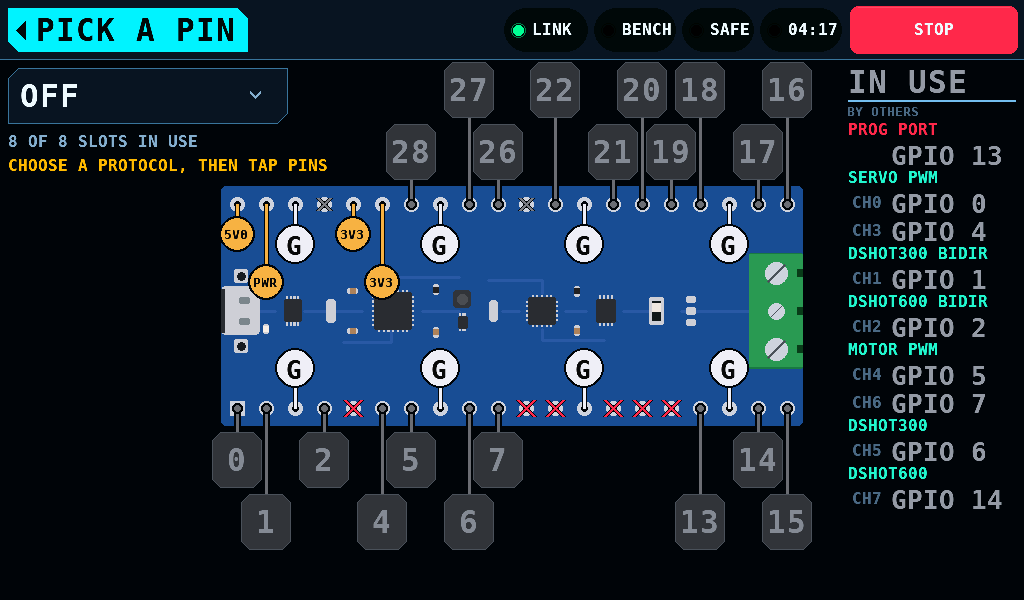
PICK A PIN shows the IOmcu board as it lies on the bench and binds a pin by a key on a trace to its pad. It holds the same binding as Outputs: the list answers which GPIO (general-purpose input/output) is bound, the picker where to put the lead. It opens from PICK A PIN on SETUP, and its home tag leads back there; over the open protocol list it closes the list first, choosing nothing. Every visit opens with OFF selected: no key binds or unbinds a pin until a protocol is picked in the list, and the line under the list reads CHOOSE A PROTOCOL, THEN TAP PINS.
The board and its keys
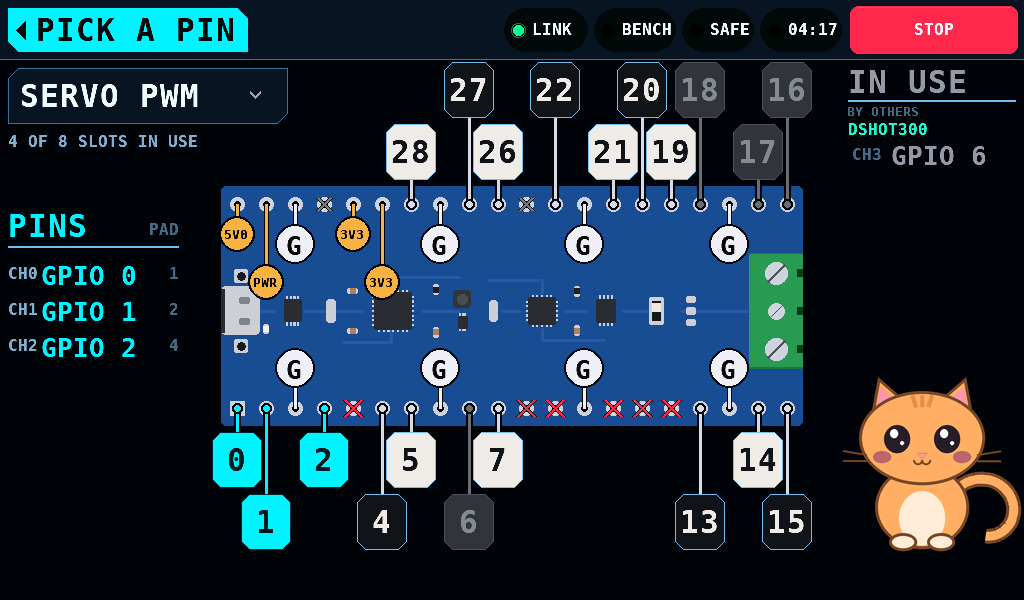
A pad is under 40px across, smaller than a fingertip. So each pin has a key, 50 x 56px, on a straight trace to its pad: two staggered rows above the board and two below.
| Key | Pin | A tap |
|---|---|---|
| ivory or ebony | free | binds it to the selected protocol |
| accent colour | bound in the selected protocol | gives it back |
| grey | held by another protocol or the programming port, the protocol is full, or the binding is not confirmed | changes nothing |
| no key, red cross on the pad | reserved: GPIO 3 heartbeat, GPIO 8 to GPIO 12 CAN (Controller Area Network) | none |
A tap on a key writes the binding at once, with the same results as a tick on Outputs.
Current limitation: on a board with a pin in the top-left corner of its outline, the keys of the upper rows lie under the protocol list, the count and the reason. A press on the part of such a key over the protocol list opens the list instead of taking the pin. The RP2350-CAN has no pin there.
The board also marks the other wires of a servo lead:
| Mark | Pad |
|---|---|
| white round marker with G | ground |
| amber round marker with 5V0 or 3V3 | a rail at that voltage |
| amber round marker with PWR | VSYS, a rail that is an input |
| dim cross on the pad | neither, such as RUN and 3V3_EN |
The protocol list and the counts
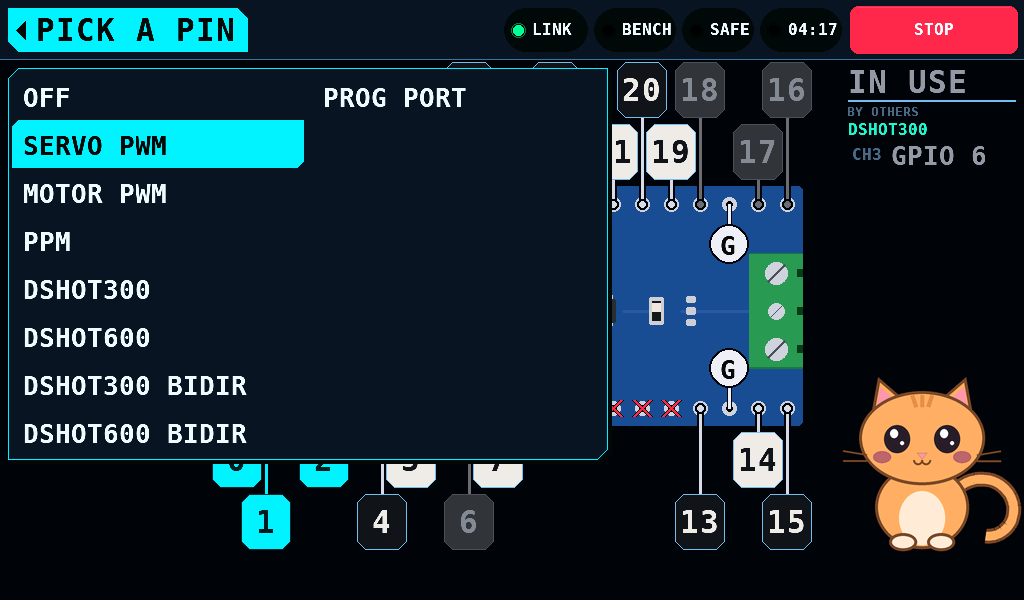
Top left is the protocol list, the same control as on Outputs. A pick selects the protocol a tap on a key joins and writes nothing. A tap outside the open list closes it.
Under the list, 4 OF 8 SLOTS IN USE counts the pins over every protocol. Under that, in amber, stands the reason no key can be added:
| Line | When |
|---|---|
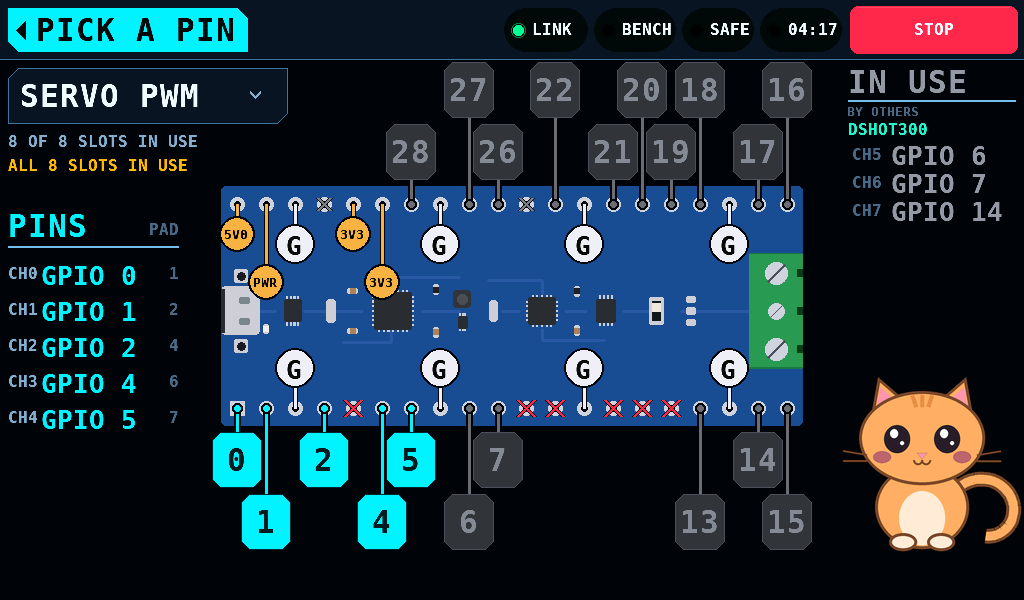
ALL 8 SLOTS IN USE | 8 pins are bound over all protocols |
NEEDS 8 CHANNELS, 4 FREE | PPM, with 4 servo pins bound |
SERVO PWM TAKES 8 PINS | the selected protocol holds as many pins as it takes |
CHOOSE A PROTOCOL, THEN TAP PINS | OFF is selected |
NOT READ | the binding is not confirmed; every key is grey |
GPIO 28: SHARES PWM SLICE WITH PROG PORT GPIO 13 | a tap on GPIO 28 under SERVO PWM or MOTOR PWM while the programming port holds GPIO 13: one PWM slice; the key is grey |
GPIO 16: SAME PWM CHANNEL AS GPIO 0 | a tap on GPIO 16 under SERVO PWM or MOTOR PWM with GPIO 0 bound as PWM: one PWM compare register; the key is grey |
PINS and IN USE
PINS, down the left, lists the selected protocol's pins in channel order with the pad number printed on the board. IN USE, down the right, lists the pins other protocols hold, each group under its protocol's name. With OFF selected PINS is not shown, because OFF holds no pin, and IN USE lists every bound pin.
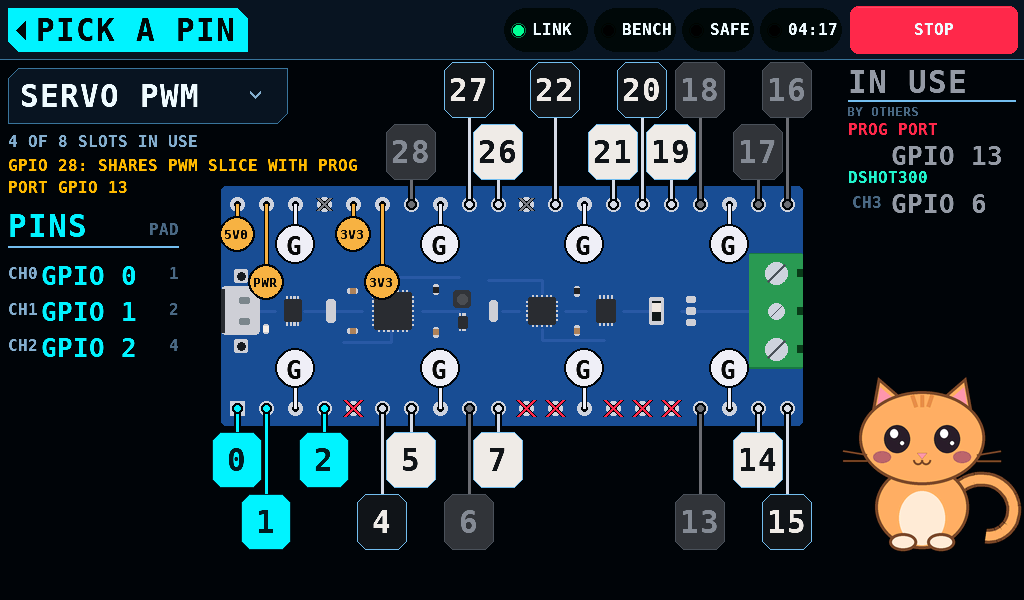
The programming port's pin, GPIO 13 (pad 17) by default, is grey while no protocol holds it, and IN USE lists it first under PROG PORT. Each further port the IOmcu reports holds its pin the same way, listed under the same name.
A programming port's pin
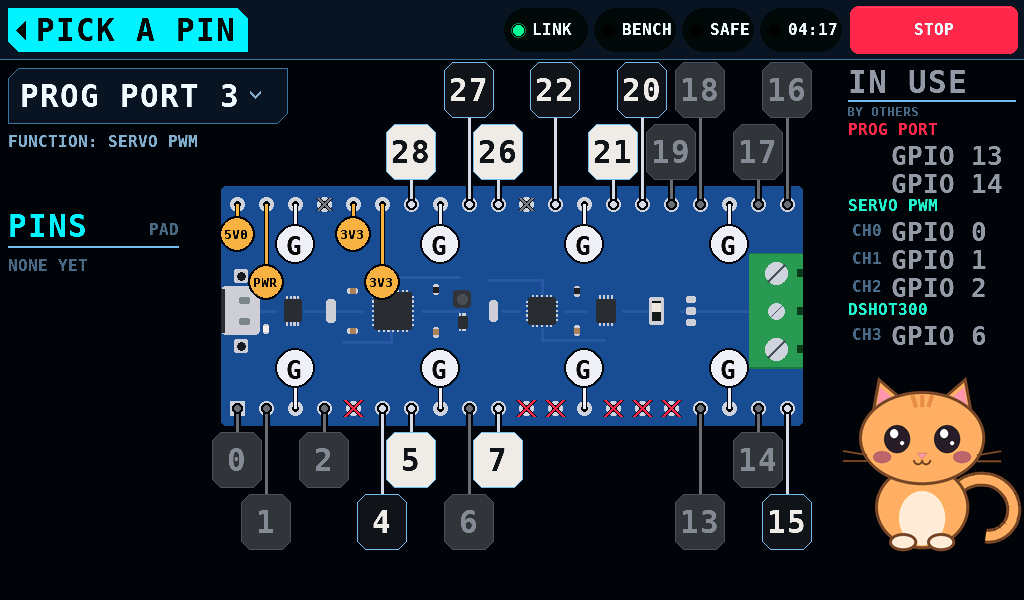
The protocol list ends in the PROG PORT entries, as on Outputs, whose PIN button opens this screen on its port. With a port picked a tap sets that port's pin: a free key asks the IOmcu for that pin, the port's own accented key asks for none. Another port's pin, a protocol's and an interface's stay grey. A SERVO PWM port is refused a pin on the PWM slice of a bound PWM output, GPIO 5: SHARES PWM SLICE WITH OUTPUT GPIO 4, and one on the compare register of another SERVO PWM port, GPIO 28: SAME PWM CHANNEL AS GPIO 12. A NONE port takes any free key. The count line names the port's function, FUNCTION: SERVO PWM. The ask waits for a bench at rest; the amber line says how it stands, as on Outputs. Before the IOmcu's ports are read every key is grey under PORTS NOT READ YET.
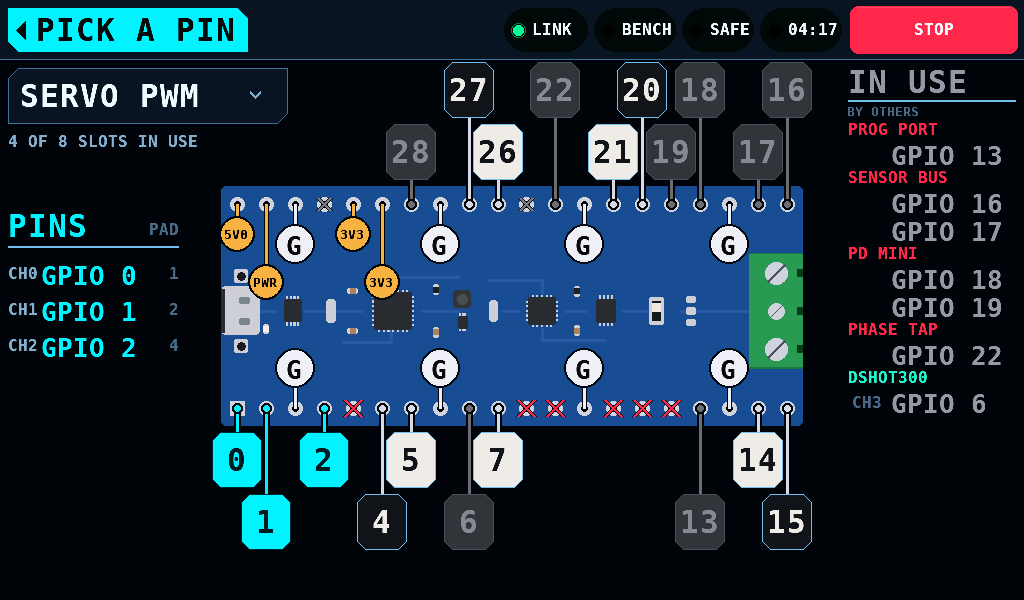
A pin SETUP > INTERFACES holds is grey the same way, and IN USE lists it after the programming port under SENSOR BUS, PD MINI or PHASE TAP. A table with more lines than fit ends in +N, N the lines left out.
The board drawing
The IOmcu carries a drawing of itself: outline, parts and every pad, to scale in 0.01mm. The panel fetches it over the link, keeps it in flash and shows it only when it matches the board's shape and pin catalogue.
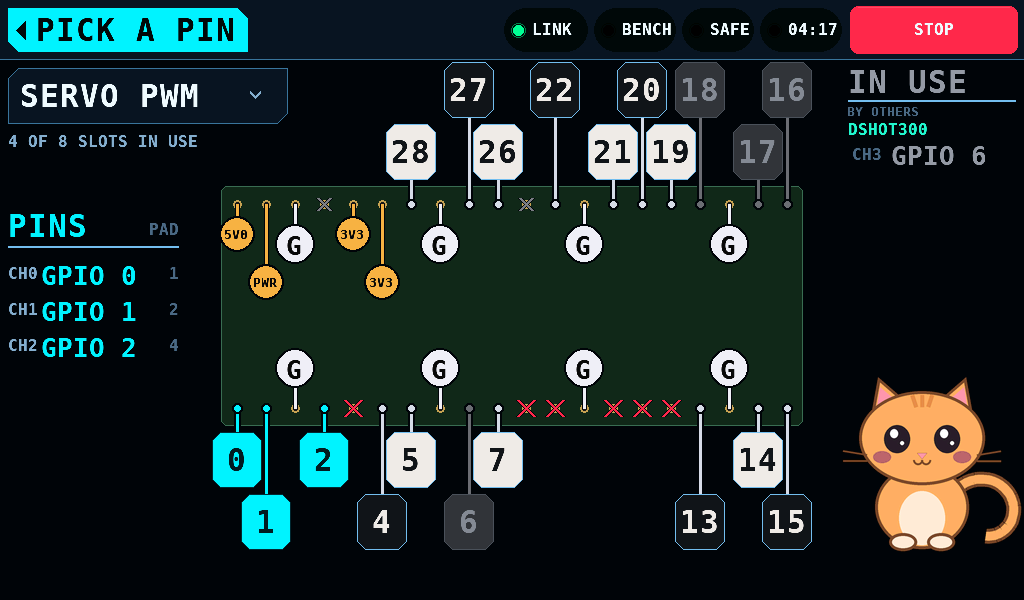
Without a drawing, or while the transfer is not finished, the outline and pads are drawn from the board's shape, and the keys are in the same places. A board that does not report its shape is not drawn: the screen reads NO BOARD IMAGE AVAILABLE, and its pins are on Outputs.
The drawing of the RP2350-CAN is 1,560 bytes, fetched in 26 blocks of 62 bytes. The time this takes is not measured. Writing it to flash waits for a bench that is SAFE with the supply off.