Servo
SERVO drives a servo, measures its current on the servo rail, runs an automatic test across supply voltages and searches the travel limits of the installed servo. It opens from the SERVO tile on the menu, on LIVE.
The workbench
The strip under the band holds SERVO's tasks: LIVE, TEST, PROGRAM and SETTINGS. A tab switch is no level: the home tag goes home from every task, and climbs one level only from a run's settings back to TEST and from a programmer back to PROGRAM's list. Each task keeps its page and selection until the panel restarts. Leaving SERVO switches the bench to SAFE.
| Task | Left card |
|---|---|
| LIVE | the horn's angle, the dial, the readings COMMANDED, MEASURED and CURRENT along its foot, and a run's box left of the dial |
| TEST | the AUTOMATIC TEST and LIMIT RUN cards, each with its SETTINGS, a summary line, its start hold, the last result and its file; SUPPLY's caps, read-only |
| PROGRAM | the list of programmers; a row opens its programmer over the left column (Servo programmer) |
| SETTINGS | the pages OUTPUT, SWEEP and DUT (Servo settings) |
The right card is the output card, the same on every task: the type row, the meter line and plot, the supply line, SPEED, the TARGET row, CENTRE, SWEEP, RELEASE and ARM. Every row tapped there is 48px (7.2mm) tall or taller, and ARM is 60px. The rotary knob moves the horn on LIVE only.
At rest
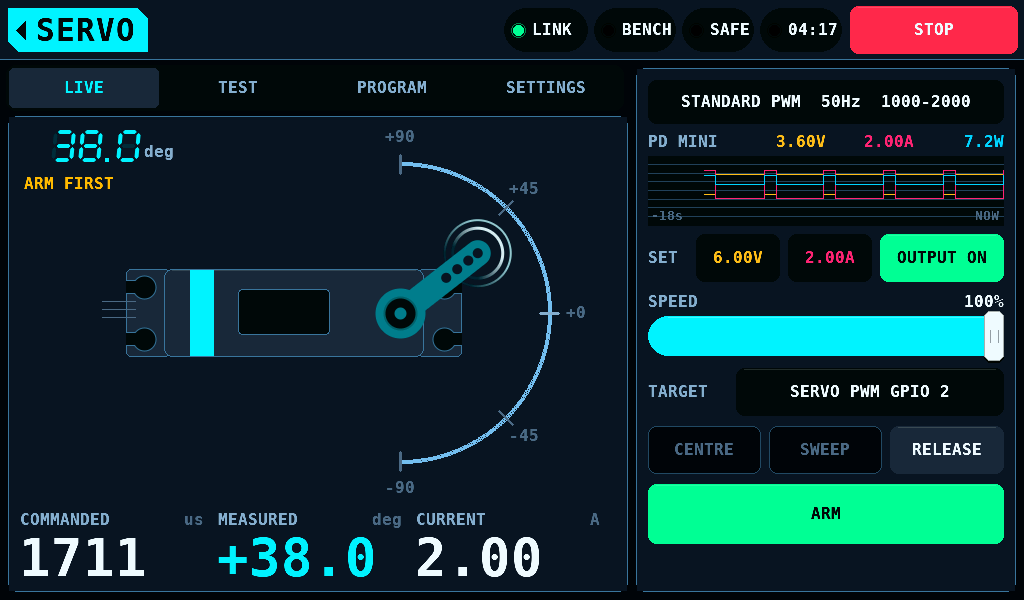
While the bench is SAFE the horn is drawn dimmed and LIVE's left card reads ARM FIRST. The dial takes no position. The IOmcu writes a pulse of length zero to every servo PWM (pulse-width modulation) pin.
LIVE's readings, along the foot of the left card:
| Reading | Shows |
|---|---|
| COMMANDED | the pulse width the screen commands, in us |
| MEASURED | the horn's angle from the AS5600 output encoder while it is on and sees its magnet, -180.0 to +179.9deg; --- otherwise |
| CURRENT | the servo rail's current from its meter, in hundredths of an amp |
The right card, from the top:
| Row | Shows |
|---|---|
| type row | the servo type, frame rate and pulse range in force: STANDARD PWM 50Hz 1000-2000 |
| meter line and plot | voltage, current and power of the rail, plotted over the last 17.8s |
| SET | the supply's voltage and current limit, and its output switch |
| SPEED | the rate the bench may move the output, 100% passes the command straight through |
| TARGET | what the tester drives, protocol pins: SERVO PWM GPIO 2, PROG PORT 1 GPIO 13, or a warning; a tap opens Outputs, where it is picked (the TARGET row) |
ARMED
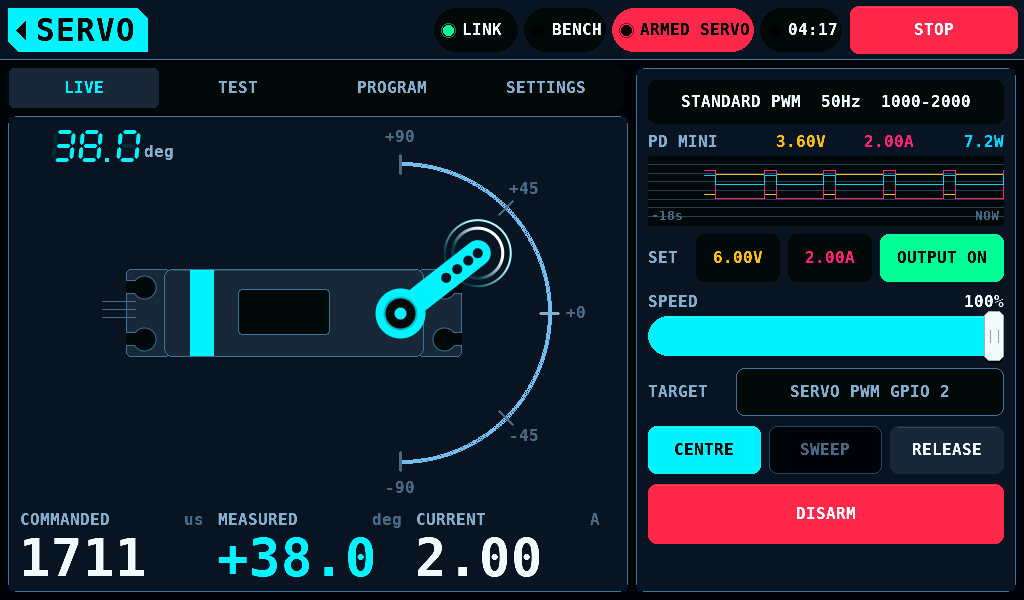
- Hold ARM for 2s. The band then shows ARMED SERVO, and the button reads DISARM.
- On LIVE, drag anywhere on the sweep to command a position. The solid arm is the measured position, the faint arm the commanded one.
- Lifting the finger does not let go: the screen repeats the last position, so the servo stays where it was put.
- Tap DISARM, press STOP or leave the screen to switch to SAFE.
ARMED SERVO drives the servo outputs and a pulsing PROG PORT. Throttle outputs get no pulse.
| Control | SAFE | ARMED |
|---|---|---|
| The dial | refused | commands the position under the finger |
| Rotary knob | refused; the turn is not kept | moves the horn from the commanded value |
| CENTRE | refused; drawn dimmed | commands PULSE CENTRE plus TRIM |
| SWEEP, PAUSE, PAUSED | refused; drawn dimmed | starts, pauses and resumes the sweep |
| RELEASE | sends the release | returns the surfaces to their rest: 1500us for STANDARD PWM, 760us for NARROW 760 |
| SPEED | set | set; a held position is sent again at the new rate |
| START TEST | refused: ARM FIRST | starts the automatic test after its hold |
The switch to ARMED sets the commanded value to the rest, the midpoint of the channel's end points, without TRIM. The first drag or knob turn starts from there. SWEEP is grey without a bound surface, without the link, or with an IOmcu older than 0.10.0.
The servo rail's meter
The line over the plot names the meter of the servo rail:
| Name | Meter |
|---|---|
INA 0x41 CH2 | the INA3221 channel that watches the servo tester's target in SETUP > SENSORS, here 0x41's CH2: the mean current and voltage of its last 50ms window, 20 points a second |
PD MINI | the PD mini supply's last sample, or the panel's supply model |
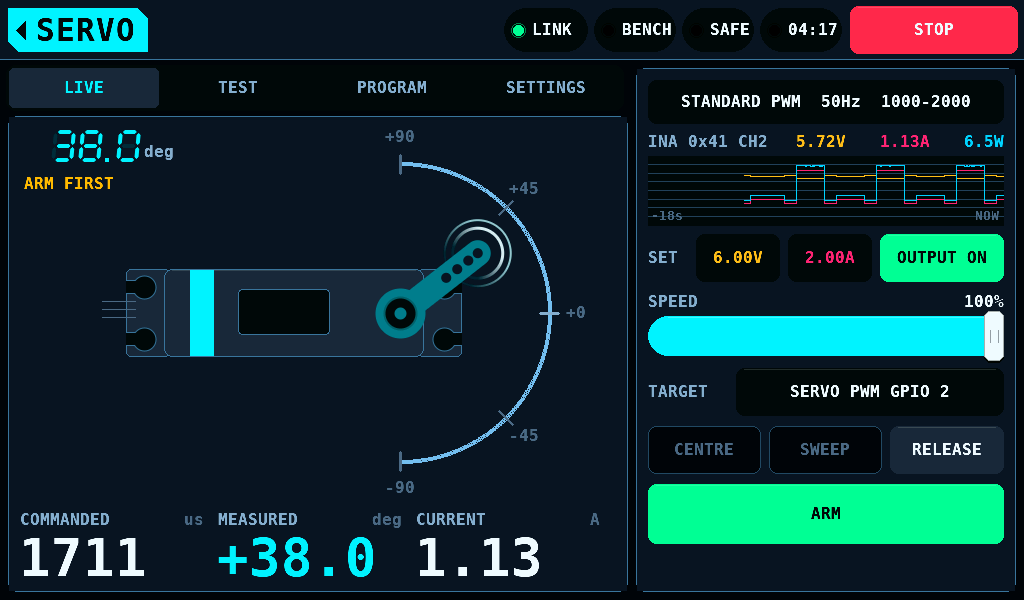
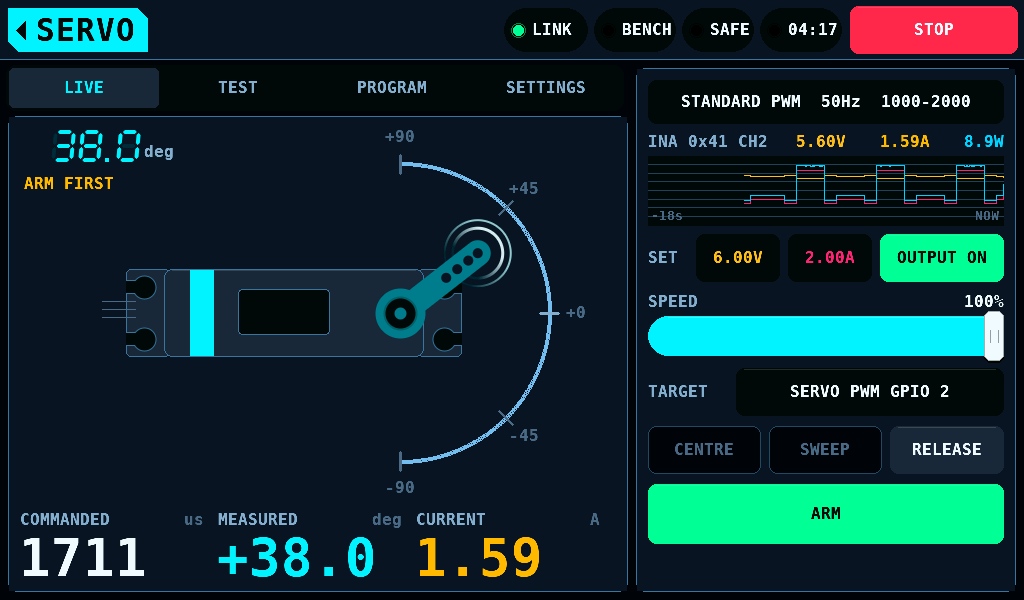
The INA3221 becomes the meter 1000ms after its conditions hold: a channel of a fitted part watches the tester's target in SETUP > SENSORS (on an IOmcu older than 0.22.0, CH1 of its part), the IOmcu is 0.16.0 or later, and windows with current samples arrive. A window in which a sample hit the end of the range, 1.638A on a 0.1Ω shunt, shows in the warning colour: its mean is then a bound.
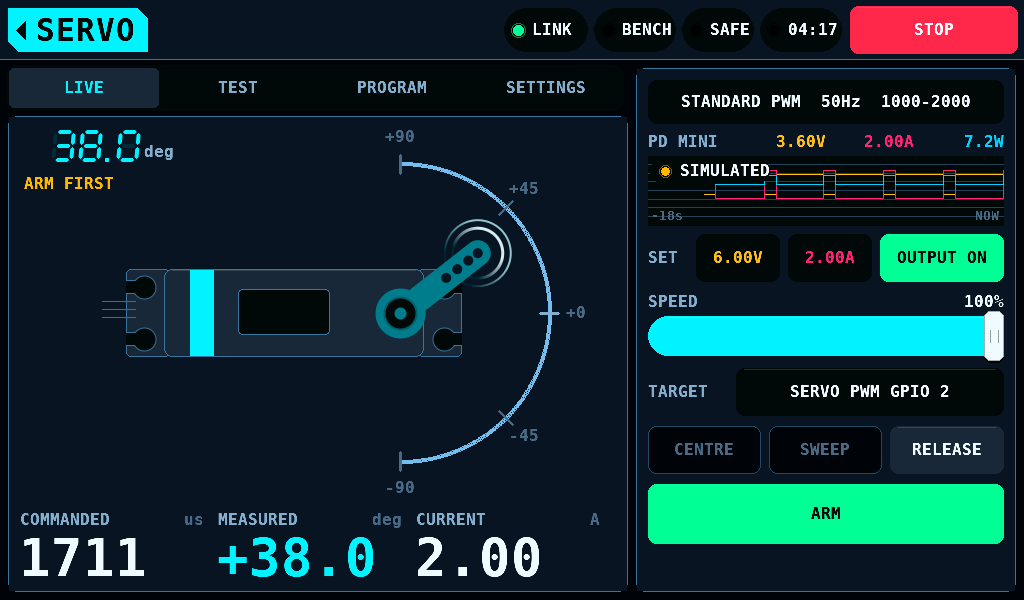
While the PD mini is disabled on SETUP, INTERFACES, the supply is the panel's model, and a SIMULATED pill sits on the plot. Its readings are simulated, not measured.
A reading that did not arrive is --- in LIVE's CURRENT, -- on the line and a gap in the plot.
The supply on SERVO
The SET line holds the SUPPLY screen's two set points and its output switch. A change on either screen is the change on both.
- A tap on a set point opens the keypad over the left card.
- OUTPUT ON is a 2s hold, OUTPUT OFF a tap.
- Leaving SERVO switches off an output SERVO switched on.
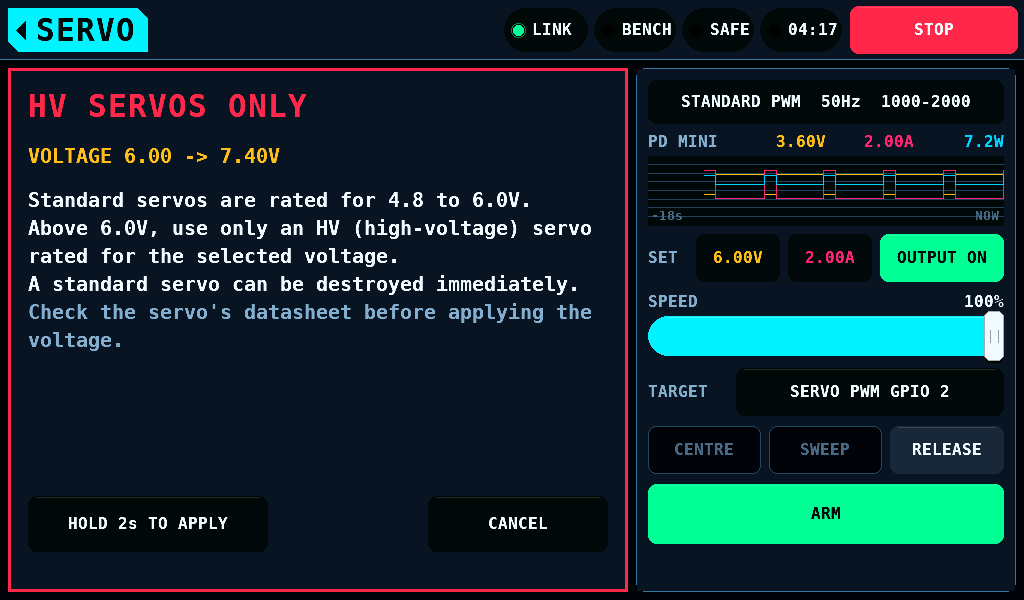
Standard servos are rated for 4.8 to 6.0V. A voltage raised from 6.0V or below to above 6.0V opens HV SERVOS ONLY. The voltage is applied after HOLD 2s TO APPLY is held; CANCEL drops it. OUTPUT ON with a set point above 6.0V opens the same warning.
SWEEP and PAUSE
SWEEP moves the servo along SETTINGS > SWEEP's CURVE (square, sine or triangle) at its SPEED, 0.05 to 5Hz, across RANGE, 10 to 100% of the travel. The IOmcu times the curve, so the link's timing does not shape it. While a sweep runs the button reads PAUSE. A tap holds the servo where it is and the button reads PAUSED; a tap on PAUSED carries the sweep on from that point.
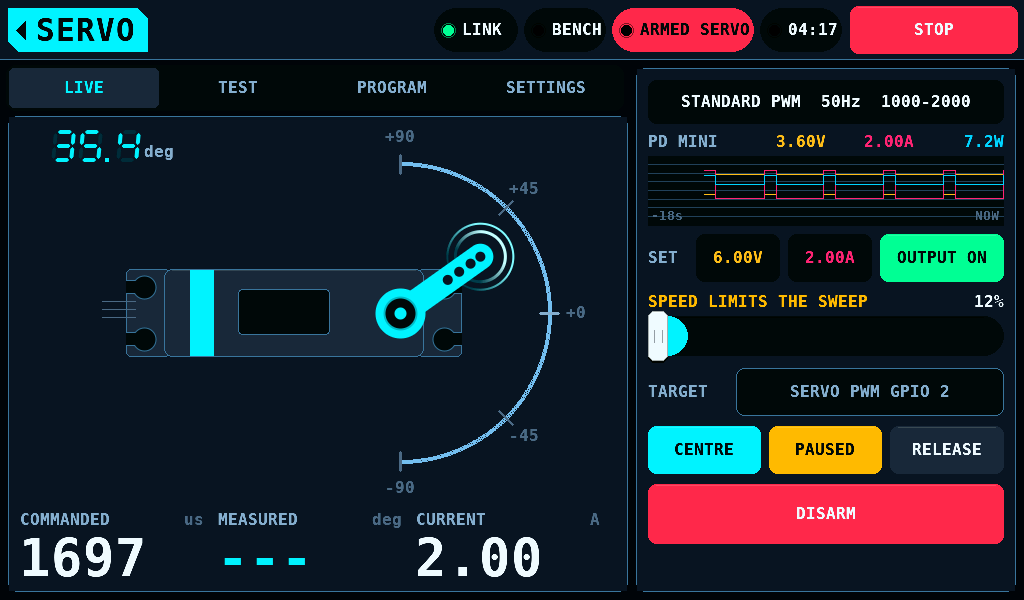
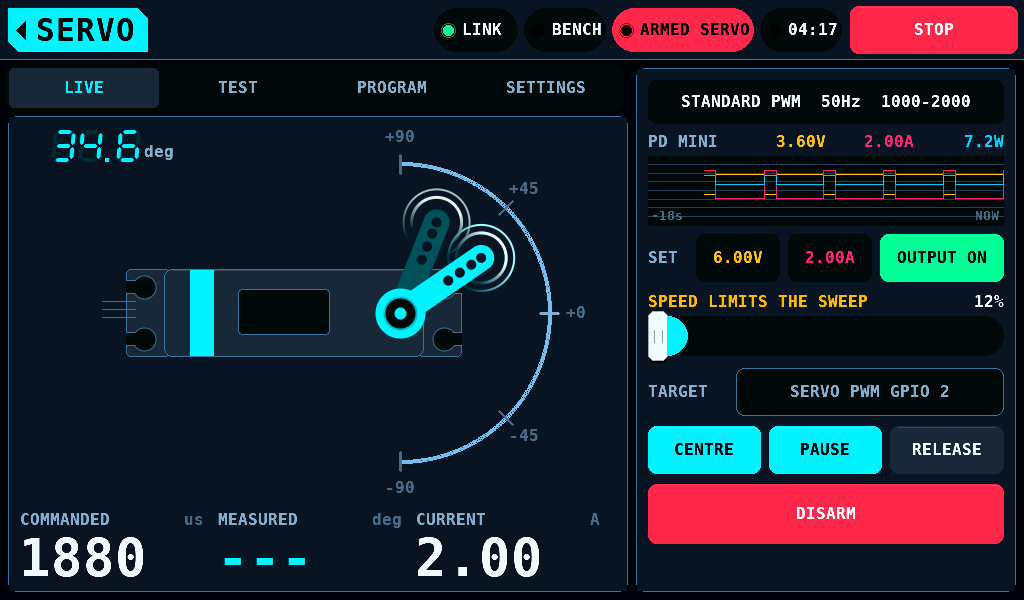
SPEED LIMITS THE SWEEP replaces SPEED's label, in the warning colour, while SPEED is slower than the fastest change the curve asks for. The curve then moves as ramps. Raise SPEED, or lower SETTINGS > SWEEP's SPEED or RANGE. With the SWEEP page's defaults (sine, 0.5Hz, RANGE 80%) and TRAVEL 90deg each way it clears at SPEED 63%.
A finger on the dial, CENTRE, RELEASE, STOP, a switch to SAFE and leaving the screen end a sweep.
The automatic test
START TEST on TEST's AUTOMATIC TEST card steps the servo through the supply voltages chosen in the card's settings. At each step it measures the current at rest, moving and holding, times the travel, and finds the voltage at which the servo stops moving. START TEST is a 2s hold. It needs the bench ARMED and a supply that answers; otherwise the card's state line names the reason: ARM FIRST, NO STEP CHOSEN, SUPPLY NOT ANSWERING, RANGE TOO SMALL, A STEP IS OUTSIDE THE CAPS or LAST REPORT STILL WRITING.
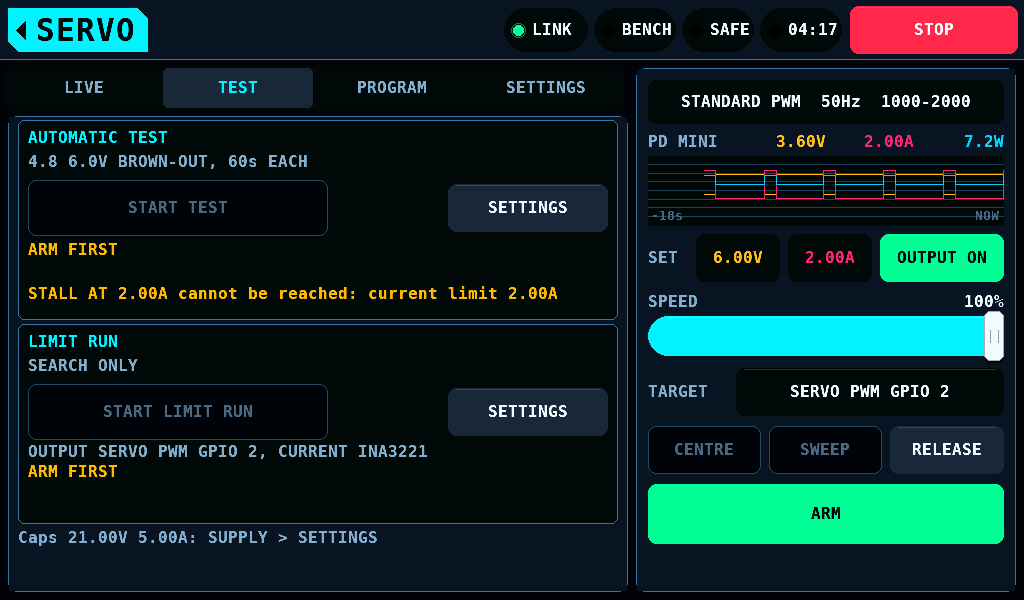
The card's summary line names the steps and the length of each, 4.8 6.0V BROWN-OUT, 60s EACH. Under START TEST the state line, then the last result and its files, LAST: PASS ATEST004.CSV + .TXT.
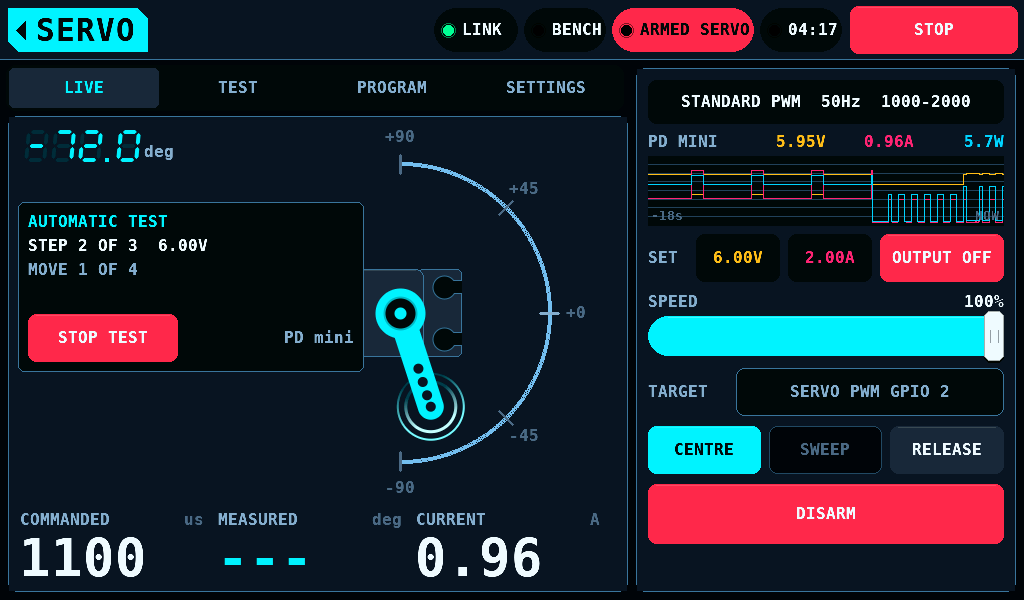
TEST stays shown as the run starts, and the card's state line reads the step. LIVE shows its step and phase in a box left of the dial, under ARM FIRST, with the meter beside STOP TEST: PD mini, the channel, INA 0x41 CH2, or SIMULATION. The run ends early, the output off and the servo released, on STOP TEST, STOP, a switch to SAFE, a lost link, leaving the screen, a finger on the dial, CENTRE, SWEEP, RELEASE, a tap on a set point, or a change to the servo's settings. A run on the INA3221 also ends when the INA3221 stops being the meter, or when no window with both current and voltage arrives for 200ms (4 windows of 50ms): no INA3221 window for 0.2s.
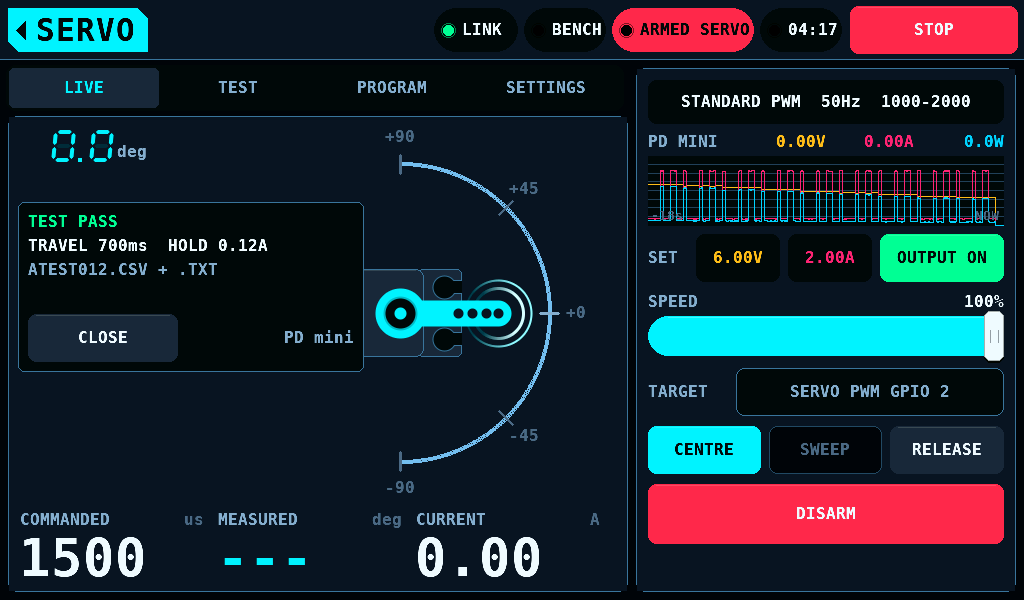
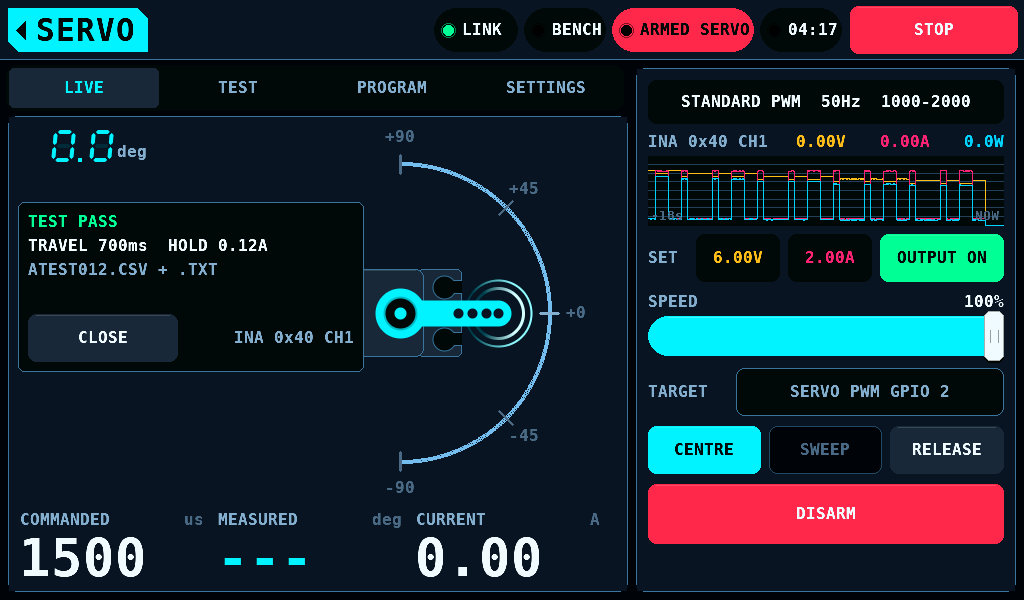
The result stays in LIVE's box until CLOSE, and on the card's LAST line until the next run: PASS, FAIL or ABORTED and why, the longest travel time, the highest holding current, and the files the card took, ATESTnnn.CSV and + .TXT for the report, in USER/LOGS. With User logs OFF on SETUP > SD CARD the line reads USER LOGS OFF and no file is written.
The limit run
The limit run finds where the installed servo binds at each end of its travel. It can then lower the servo's own LEFT ANGLE and RIGHT ANGLE, so the servo stops short of the binding point. It is TEST's LIMIT RUN card; SETTINGS on the card opens its settings.
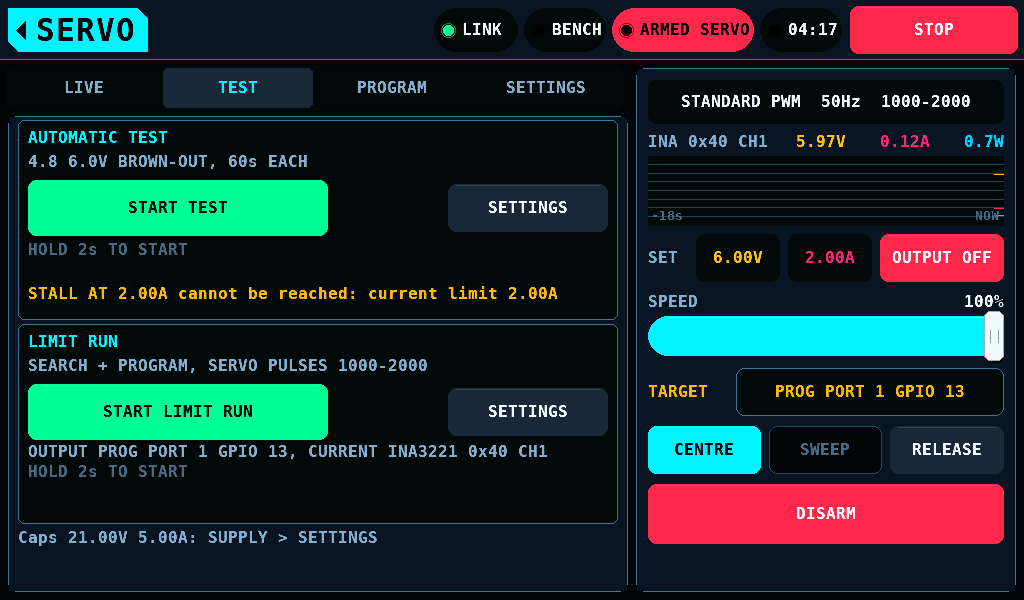
- Tap SETTINGS on the card, then LIMIT RUN to choose SEARCH ONLY or SEARCH + PROGRAM.
- With TARGET on PROG PORT, tap SERVO PULSES to choose KEEP or 1000-2000. It starts at KEEP.
- Tap the home tag to go back to the cards.
- Hold START LIMIT RUN for 2s while the bench is ARMED. A tap or a shorter hold starts nothing.
- TEST stays shown. The box on LIVE's left card shows the phase, the side and the pulse, and the output it drives.
The line under the button names the output and the meter, the whole time: OUTPUT PROG PORT 1 GPIO 13, CURRENT INA3221 0x41 CH2 or OUTPUT SERVO PWM GPIO 2, CURRENT INA3221 0x40 CH1. The TARGET row stays in sight as well.
The run reads only the INA3221 channel that watches the tester's target. With the PD mini or the model as the servo rail's meter, START LIMIT RUN stays grey and the line says why:
| Line | Condition |
|---|---|
ARM FIRST | the bench is SAFE |
INA3221 NOT SET UP TO MEASURE SERVO SUPPLY CURRENT | no channel of a fitted INA3221 watches the tester's target in SETUP > SENSORS |
INA3221 OFFLINE | no link, or the INA3221 does not answer |
NO INA3221 MEASUREMENT WINDOWS YET | the INA3221 is not the meter yet |
SERVO SUPPLY BELOW 3.0V OR NOT READ | the last INA3221 window has no rail voltage, or less than 3.0V: an output that is off reads 0V |
PORT PWM OFF. NO PULSES ON THIS PORT. | TARGET is PROG PORT with PORT PWM off |
NO SERVO PWM PIN, PINS NOT READ | TARGET is the bench's outputs, and no output is bound as SERVO PWM, or the binding is not read yet |
CENTRE MUST BE BETWEEN PULSE MIN AND MAX | the pulse range does not hold PULSE CENTRE |
LAST REPORT STILL WRITING | a test or a run is under way, or its report is still going to the card |
The search
The search steps outward from the centre, the low side first, 10us a step. Each position takes 250ms: 120ms to settle, then the mean of the next windows. An end binds when the current exceeds 1.8 times the free current and exceeds it by at least 0.15A. The endpoint is reported 25us back from the binding position. The bench's own PULSE MIN and PULSE MAX are not changed.
| TARGET | Search |
|---|---|
| a SERVO PWM pin | from PULSE CENTRE out to PULSE MIN and PULSE MAX; nothing is read or written |
| PROG PORT | a read session first, then from the servo's NEUTRAL out to its own PULSE LOWER and PULSE UPPER, never past them |
The read session holds the servo at PULSE CENTRE, switches the bench to SAFE, reads the servo with CONNECT, gives the port back with LEAVE and switches the bench to ARMED. Nothing is driven before it. The run ends as FAIL before any search when:
- no KST or Chaservo servo is read (
no KST or Chaservo servo read): search a servo that is no KST or Chaservo on a SERVO PWM pin; - NEUTRAL is not between PULSE LOWER and PULSE UPPER (
NEUTRAL outside LOWER/UPPER); - PULSE LOWER to PULSE UPPER is not inside PULSE MIN to PULSE MAX (
servo pulses outside MIN/MAX). The bench stays SAFE, and the box names both ranges.
A first CONNECT that fails for another reason, or a read that does not complete, ends the run as ABORTED with programming port session failed.
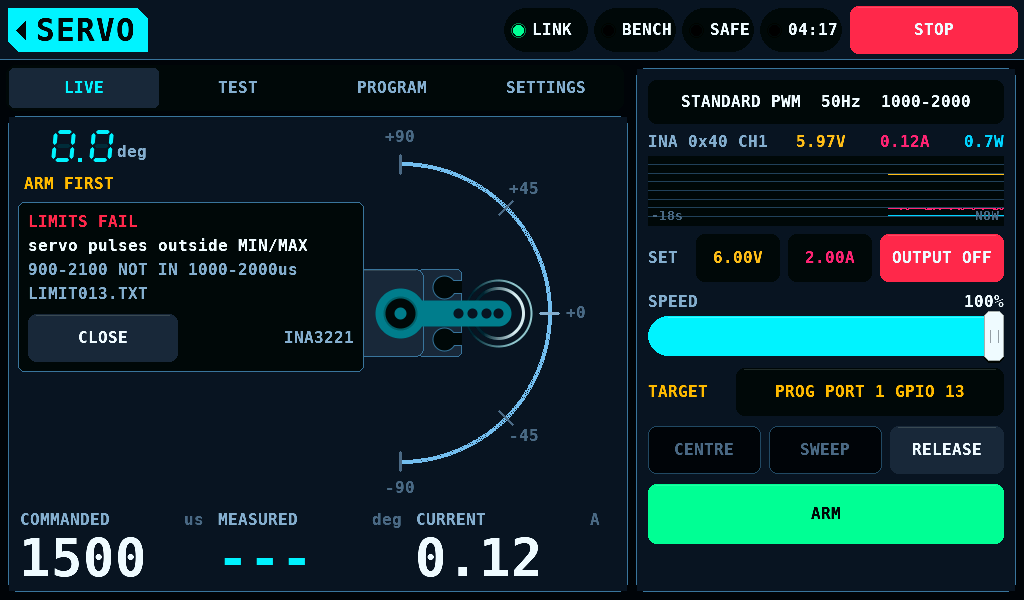
A KST servo as delivered holds PULSE LOWER 900.0us and PULSE UPPER 2100.0us. The STANDARD PWM type's range is 1000-2000us, so that servo is refused at KEEP. Choose SERVO PULSES 1000-2000, or a PWM type whose range holds 900 to 2100us.
SERVO PULSES at 1000-2000 writes PULSE LOWER 1000.0us and PULSE UPPER 2000.0us in the read session, before anything moves, and reads them back. NEUTRAL is not written. A servo at those values already gets no write. With SEARCH ONLY these two values are the only write.
Programming LEFT ANGLE and RIGHT ANGLE
SEARCH + PROGRAM needs a KST or Chaservo servo on the programming port: TARGET on PROG PORT, the port in PWM, and 4.8V or more. With a PD mini, its output must be on and its set point counts; without one, the servo rail in the INA3221's last window counts. On the bench's outputs LIMIT RUN reads SEARCH ONLY and the settings' note says why. On PROG PORT every run starts with a read session, SEARCH ONLY included, and it needs a KST or Chaservo servo: with another servo the run ends with no KST or Chaservo servo read. A port not in PWM, a PD mini output that is off, or a supply under 4.8V keeps the button grey for SEARCH ONLY as well, and the card's state line names the condition.
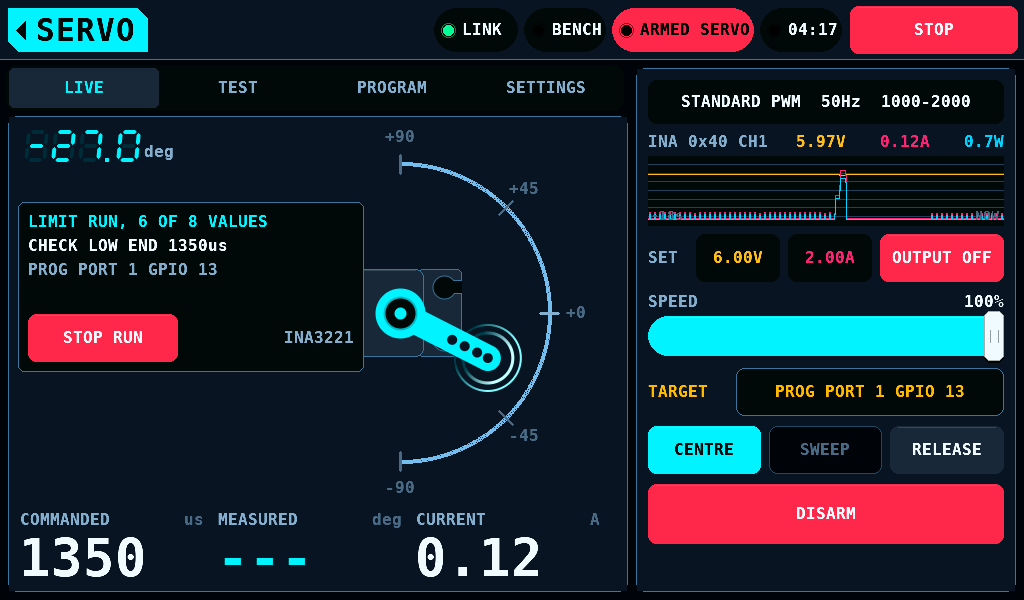
The run writes in sessions of the servo programmer:
- The servo goes back to the centre for 1000ms.
- The run switches the bench to SAFE.
- CONNECT reads the servo.
- One write, with every limit check of the programmer.
- LEAVE gives the port back to PWM.
- The run switches the bench to ARMED and searches that side again.
The first write saves the servo's values to a backup file on the card. The run takes the servo as linear: PULSE LOWER and PULSE UPPER are the pulses at which it reaches the full travel that LEFT ANGLE and RIGHT ANGLE set. The share of a side at pulse p is (p - NEUTRAL) / (PULSE LOWER or UPPER - NEUTRAL). The unit of LEFT ANGLE and RIGHT ANGLE is not known, and the linear relation is an assumption.
Each bound side gets two writes, v0 the value its register held:
- The overset: v0 x the share at the first bound pulse x 1.03, rounded up. The stop stays reachable, close to the pulse limit. The run searches that side again. Free there, the run ends as FAIL,
no stop after the overset write. - The final value: the overset x the share at the last free pulse of that search, rounded down.
Example: NEUTRAL 1500.2us, PULSE LOWER 900.0us, v0 150, the first search free at 1000us and bound at 990us. The overset is 150 x 0.850 x 1.03 = 132. At 132 the search is free out to 930us; the final value is 132 x 0.950 = 125.
Near the pulse limit, where the overset would move the stop less than 20us, the run writes the final value at once: v0 x the share at the first search's last free pulse. The first bound side's first write also finds which register limits that side. Last, the run searches both ends again: PASS when both are free, FAIL when one binds. A run writes 8 values at most: the two pulses, two on each side, and two to find the register. A value below 50 is a soft limit: the 2s start hold is the consent to it.
What ends a limit run
Each of these ends the run as ABORTED, with the output off and the servo released:
- STOP RUN, STOP, a switch to SAFE, a lost link, leaving the screen, a change to the servo's settings;
- the INA3221 no longer the meter, or no INA3221 window for 200ms (
no INA3221 window for 0.2s); - during a search, a window without the rail voltage (
no rail voltage in a window), or with its mean under 3.0V, the first window included (supply or rail voltage changed); - a sample at 3.0A or more, a sample at the end of the INA3221's range, or window means above 1.0A for 400ms;
- a search longer than 40s, a bench that does not switch in 3s, or a programmer step longer than 150s;
- a change to the supply's set points or output, outside the programmer's sessions, a PD mini first heard after the start among them, its output on or off; during a search, the rail more than 1.0V from the run's first window;
- at a later session, another servo, or REVERSION, the pulses or the range of values changed (
servo holds other values).
A run that ends while it waits for ARMED also switches the bench to SAFE.
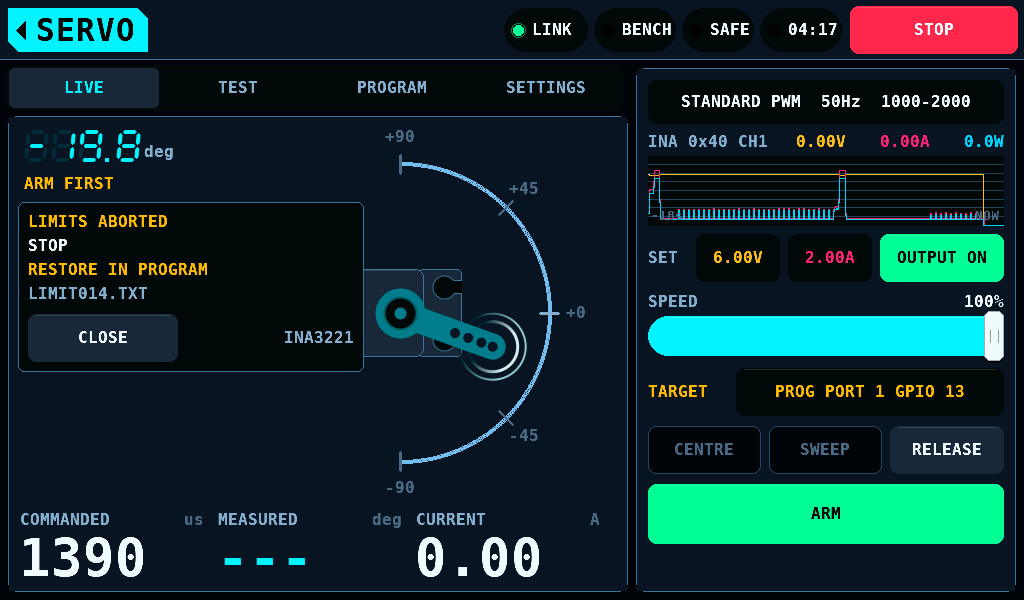
After a write the servo keeps the values last written. The box then reads RESTORE IN PROGRAM.. On the programmer, CONNECT and READ ALL, then RESTORE offers Settings before the limit run.. A session after the run saves its own backup file at its first write.
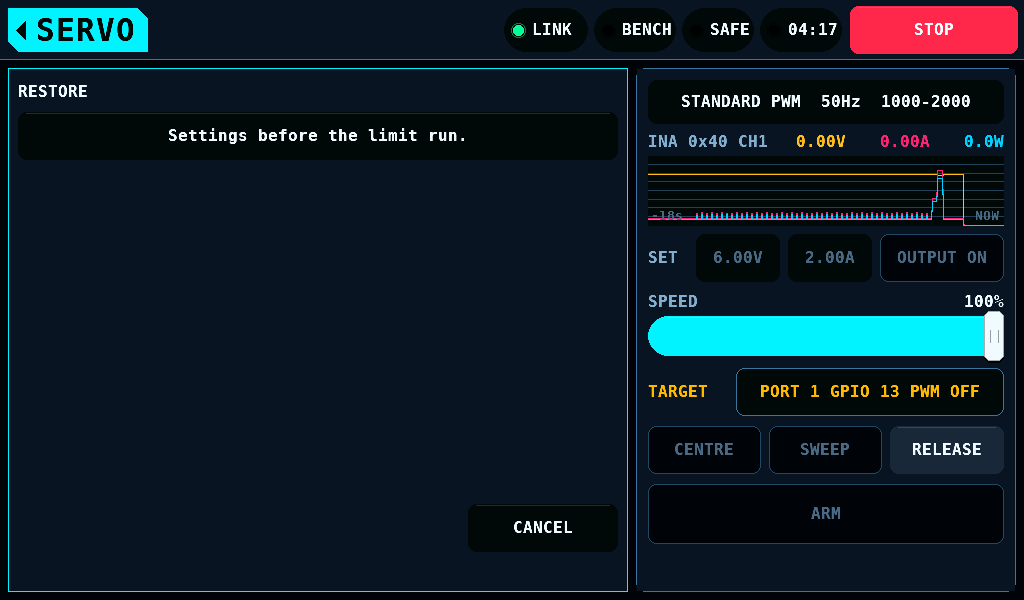
The result
The box on LIVE stays until CLOSE, and the card's LAST line until the next run. The box shows the verdict, the reason or the values, and the report's file name.
| Verdict | Meaning |
|---|---|
| FOUND | search only: an end binds; the endpoints are reported |
| FREE | neither end binds; nothing is written |
| PASS | programmed, and both ends free in the last search: LEFT 150>87 RIGHT 150>95 |
| FAIL | an end still binds, or the servo cannot be programmed |
| ABORTED | a protection, the operator, the link, the meter, the supply or the programmer ended it |
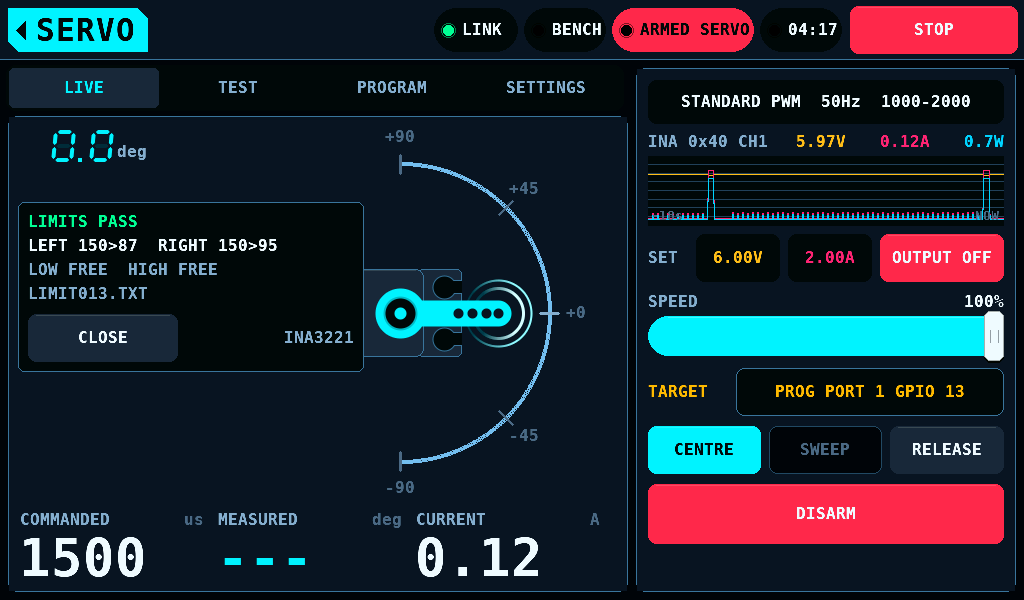
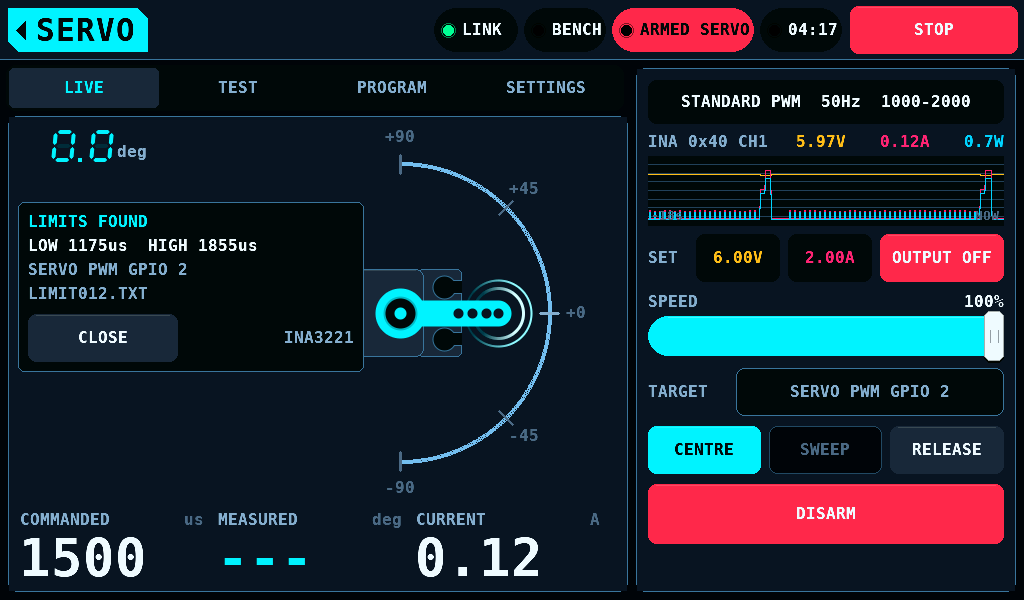
The report is a LIMITnnn.TXT of its own in USER/LOGS, written whatever REPORT says and not written with User logs OFF. It holds where the search ran, the endpoints of both searches, the servo's pulses and the pulse write, LEFT ANGLE and RIGHT ANGLE before and after with the shares, the overset and the final value, the values written, the writes sent and the sessions, the meter, the AS5600 angle at each last free position when it is fitted, and the verdict or the reason. Until the card has closed it, Wi-Fi and an update wait.
Current limitations
- On the panel's supply model the test's currents are the model's load, not the servo's.
- The unit of LEFT ANGLE and RIGHT ANGLE is not known. The limit run takes the travel as linear in the pulse; that is not measured.
- Until the screen sends a position, the pins run at the rate the IOmcu holds, 50Hz after a restart.
Related pages
- Servo settings: type, frame rate, pulses, the sweep, each run's settings and the target.
- Servo programmer: PROGRAM's row for KST and Chaservo servos.
- Supply and Interfaces: the PD mini, the INA3221 and the AS5600.